Geofencing Guide: What It Is and How It Works
You may have heard the word “geofencing” before. But what does it really mean?
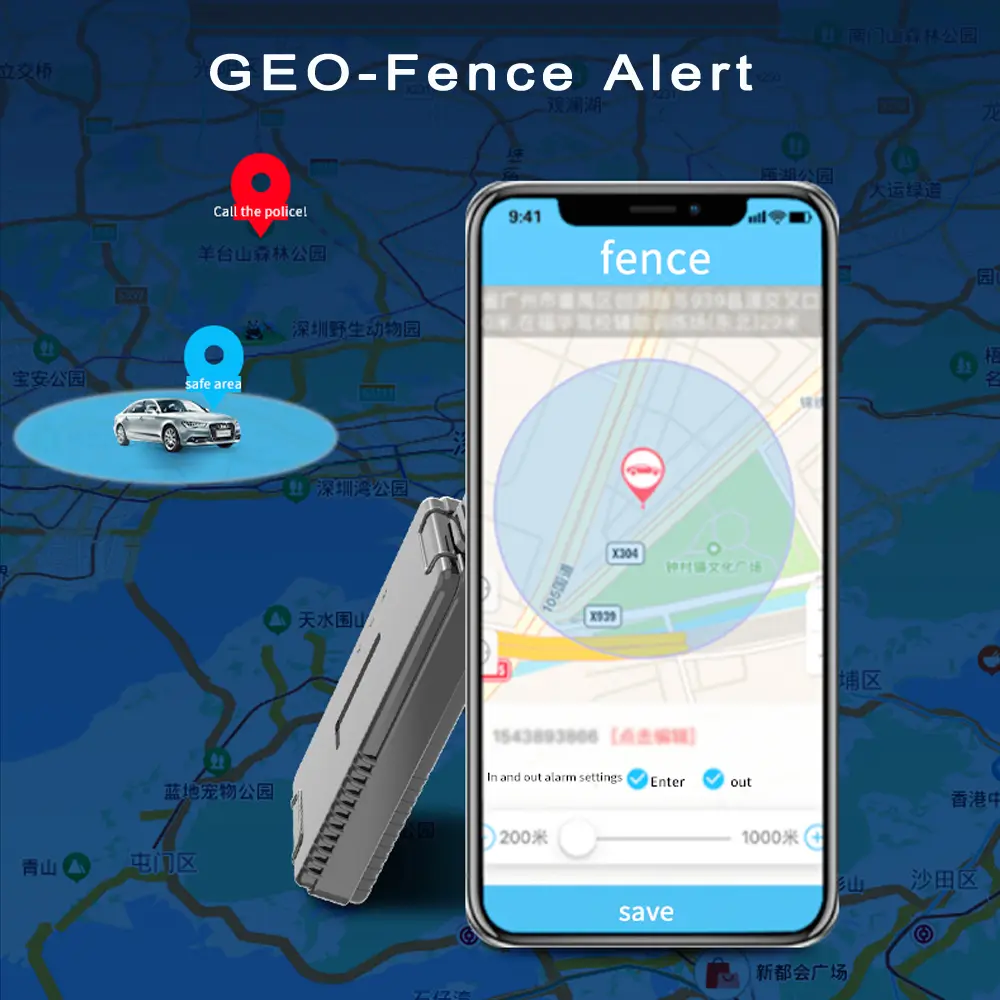
In simple terms, a geofence is a virtual fence on a map. You create it using software. And a GPS tracker makes it work.
This guide explains everything you need to know. Let’s start from the beginning.
What Is a Geofence?
A geofence is a digital boundary. It surrounds a real-world location.
For example, you can draw a geofence around your home. Or around your child’s school. You can even draw one around a warehouse or a construction site.
The shape is up to you. Some geofences are circles. Others are polygons with many sides.
Once the geofence is ready, your GPS tracker does the rest.
How does GEOFencing work?
The process is surprisingly simple.
First, you install a GPS tracker. You put it on a vehicle, a person, or an asset.
Next, you log into your tracking platform. You draw a geofence on the map.
Then, the GPS tracker sends real-time location data. The platform compares that data to your geofence.
Finally, an alert is triggered. You receive it immediately.
So, geofencing is really just smart comparison. And it happens in seconds.
What do you need for GEOFencing?
You only need three things.
- A GPS Tracker
This is the most important part. The tracker collects location data. Without it, geofencing cannot work.
Popular options include:
Real-time GPS trackers for cars
Personal GPS trackers for kids or seniors
Asset trackers for equipment or cargo
- A Tracking Platform
Most GPS trackers come with an app or web platform. That is where you draw geofences.
- A Mobile Device or Computer
You use this to set up alerts. You also receive notifications here.
That is it. With these three items, you are ready to go.
Why Use GEOFencing? (Benefits)
Geofencing is useful for many reasons. Here are the most popular ones.
- Better Safety for Family Members
You can put a personal GPS tracker on your child. Then draw a geofence around their school.
If they leave the school grounds, you get an alert. You can also track their location in real time.
The same works for elderly parents. Especially those with dementia or memory issues.
- Vehicle Anti-Theft Protection
Hide a car GPS tracker in your vehicle. Draw a geofence around your neighborhood.
If someone steals your car and drives out of the area, you know immediately.
Some GPS trackers even let you cut the engine remotely. That stops the thief right away.
- Fleet Management for Businesses
Delivery companies use geofencing every day.
They draw geofences around customer locations. When a truck enters or exits, the system logs it.
This helps with route optimization. It also improves driver accountability.
- Asset and Cargo Protection
Put an asset tracker on expensive equipment. Draw a geofence around the job site.
If someone moves the equipment at night, you get an alert.
The same goes for cargo. Logistics companies use geofencing to prevent theft.
- Employee Time Tracking
Some businesses use geofencing for attendance.
Employees clock in when they enter a geofence. They clock out when they leave.
This works well for construction crews, home care workers, and field technicians.
Types of GEOFencing Alerts
Geofencing is most useful when paired with smart alerts.
Here are the most common types.
Enter Alert
You get notified when someone enters the geofence.
For example, your child arrives at school. Or a delivery truck reaches the warehouse.
Exit Alert
You get notified when someone leaves the geofence.
For example, your child leaves school early. Or a vehicle leaves the job site after hours.
Dwell Alert
You get notified when someone stays too long inside a geofence.
For example, a delivery driver takes an extra-long break. Or a truck idles for too long at a rest stop.
Speed Alert Inside Geofence
Some GPS trackers also monitor speed.
You can set a speed limit inside a school zone or parking lot. If the driver speeds, you get an alert.
Real-Life Examples of Geofencing
Let’s look at some everyday situations.
Example 1: A Parent and a Teen Driver
You give your teen a car with a GPS tracker. You draw a geofence around your town.
If your teen drives outside that area, you get a text message. You can also check their driving speed and route history.
Example 2: A Pet Owner
You attach a small pet tracker to your dog’s collar. You draw a geofence around your yard.
If your dog runs away, you get an instant alert. Then you open the app and see exactly where your dog is.
Example 3: A Construction Company
You put asset trackers on your excavators and generators. You draw a geofence around the job site.
At 2 AM, someone tries to steal a generator. The tracker detects movement. You get an alert on your phone. You call the police immediately.
Example 4: A Logistics Manager
You manage a fleet of 20 trucks. Each truck has a real-time GPS tracker.
You draw geofences around your top customers. When a truck arrives, the system sends an automatic “arrival” message. When the truck leaves, it sends a “departure” message.
No phone calls are needed. You know everything automatically.
What Is the Difference Between Geofencing and GPS Tracking?
People often confuse these two terms.
GPS tracking tells you where something is. It shows a location on a map.
Geofencing tells you when something enters or leaves an area. It adds rules and alerts.
Think of it this way:
GPS tracking = a dot on a map
Geofencing = an invisible fence around that dot
Most good GPS trackers offer both features. So you do not have to choose.
How to Set Up a Geofence (Step by Step)
The exact steps depend on your GPS tracker brand. But the general process is similar.
Step 1: Buy a GPS tracker with geofencing support.
Not all trackers have this feature. So check before you buy.
Step 2: Install the tracker and activate it.
Follow the manufacturer’s instructions. This usually involves charging the device and inserting a SIM card.
Step 3: Log into the tracking platform or app.
This is where you manage everything.
Step 4: Find the geofencing section.
It is often labeled “Geofence,” “Virtual Fence,” or “Zone.”
Step 5: Draw your geofence on the map.
Zoom in on the location. Click to create points. Connect them to form a shape.
Step 6: Choose your alert type.
Select “Enter,” “Exit,” or both.
Step 7: Save the geofence and turn it on.
That is it. You are done.
Common Mistakes to Avoid
Geofencing is easy. But people still make mistakes.
Here are the most common ones.
Mistake 1: Making the Geofence Too Small
GPS accuracy is not perfect. It can be off by 10 to 30 meters.
If your geofence is tiny, you may get false alerts. So always add a small buffer zone.
Mistake 2: Using a Tracker Without Real-Time Updates
Some trackers update every few minutes. That is too slow for geofencing.
Always use a real-time GPS tracker for geofencing. Updates every 10 to 30 seconds are best.
Mistake 3: Forgetting to Turn On Alerts
You can draw a perfect geofence. But if alerts are off, you will never know when someone crosses it.
Always double-check your settings.
Mistake 4: Ignoring Battery Life
Geofencing uses more battery power. The tracker has to stay awake and send data frequently.
So plan accordingly. Charge the tracker regularly. Or choose one with a long battery life.
Frequently Asked Questions (FAQ)
- Can I use geofencing without a GPS tracker?
No. Geofencing depends on real-time location data. A GPS tracker provides that data. - How many geofences can I create?
It depends on the tracker and platform. Some allow 10 geofences. Others allow 100 or more. - Is geofencing expensive?
Most GPS trackers include geofencing for free. You only pay for the tracker and the SIM card data plan. - Does geofencing work indoors?
It depends. GPS signals are weak inside buildings. Some trackers use Wi-Fi or Bluetooth as a backup. - Can I edit or delete a geofence?
Yes. You can change the shape, move it, or delete it anytime. - What happens if the GPS signal is lost?
Most platforms send a “signal lost” alert. They also store data until the signal returns.
Final Thoughts
Geofencing is a powerful tool. It is not complicated. And it works with many types of GPS trackers.
Whether you want to protect your family, your car, or your business assets, geofencing gives you peace of mind.
You set up a virtual fence. You choose your alerts. And your GPS tracker does the rest.
Now you know how geofencing works. The next step is easy. Get a GPS tracker. Draw your first geofence. And start receiving smart alerts today.
Related Articles You May Like
What Is a real-time GPS Tracker?
Where Can You Use a GPS Tracker?
How to monitor motorcycle fuel levels?
Dynamic Speed Limiting for Emergency Vehicles
Need help choosing a GPS tracker with geofencing? Contact our team. We will recommend the right model for your needs.
24 hours hotline/Whatsapp: +86-133-8031-8225